Once you start using Recrur, it is recommended to publish job advertisements to portals directly through Recrur. This way, all candidates from different portals will come directly into Recrur, and you won’t need to check multiple channels to see which candidates have applied.
To add your job posting to CV-Online, you must first:
– Have an active CVO package for posting job ads
– If you have sub-accounts in CV-Online in addition to your main account, those can also be connected to Recrur
– Inform us about your wish to activate the integration by writing to support@recrur.com, so we can enable it together with CV-Online
We will notify you once the integration has been activated.
Opening the connection between Recrur and CV-Online portal for a single account:
Follow the steps below to activate the integration (this is a one-time setup — no need to repeat it later!):
- Log in to Recrur and go to SETTINGS (click your name in the top bar and select “Settings”).
- In Settings, choose Recruitment settings → Integrations from the left menu.
Here you will see all CV-Online partners for which you requested the integration to be enabled (Estonia, Latvia, Lithuania).
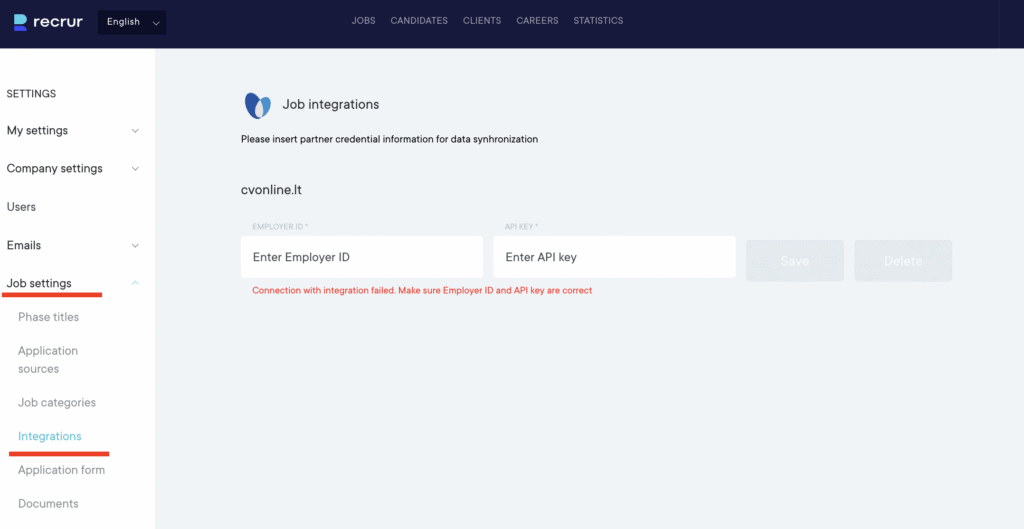
To fill in the “Employer ID” and “API key”, go to your CV-Online account:
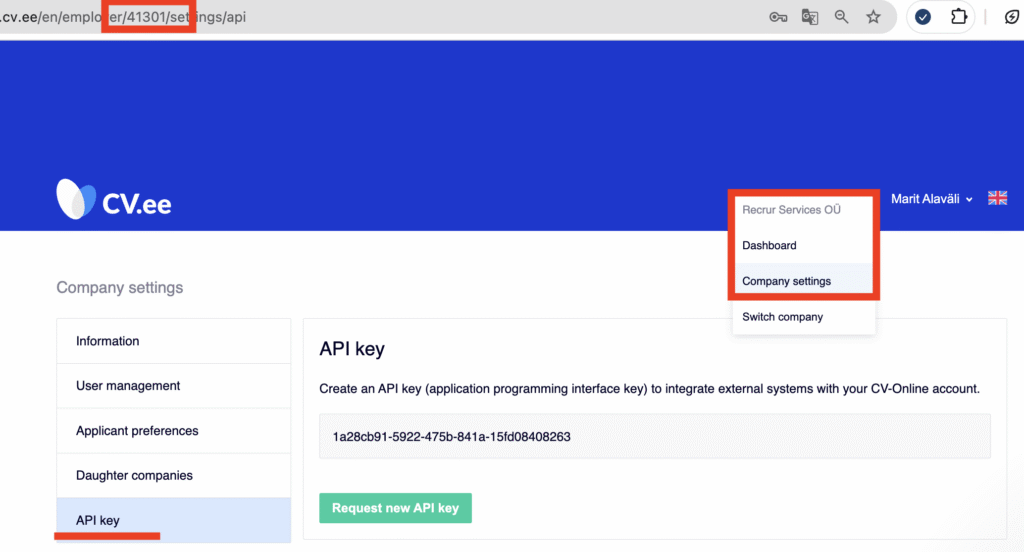
2.1 In the cv.ee environment, go to Company Settings — there you will find the API key
2.2 While in the Company Settings, copy the 4-digit number from the browser URL bar — this is the Employer ID, which you will enter in Recrur’s Employer ID field
Once you save these values, you can start publishing job ads to the CV-Online environment via Recrur.